

Not every website needs a full e-commerce platform.
If you want to sell a few products, offer digital goods, collect donations, or create a simple checkout experience, setting up a complete online store can quickly become more complex than necessary.
With the new Checkout Builder in Easy Stripe Payments & Donations, you can create a flexible, multi-step Stripe checkout directly in WordPress – without installing WooCommerce or building an entire shop system.
The goal is simple: launch faster, keep your setup lightweight, and create a checkout that fits your website.
A Lightweight Alternative for Simple Stripe Shops
Traditional e-commerce platforms are powerful, but that power also comes with additional configuration, features, and complexity.
For many websites, that may be more than they actually need.
A nonprofit selling a few supporter products, a coach offering digital resources, a freelancer selling services, or a small business with a limited product selection often doesn’t need a complete product catalog, inventory system, customer accounts, and a large e-commerce backend.
The Easy Stripe Payments & Donations Checkout Builder provides a simpler approach.
You can create your checkout directly in WordPress, add your products, collect customer information, and accept payments securely with Stripe.
Instead of building an entire online store around your products, you can build the checkout experience you actually need.
Create Multi-Step Stripe Checkouts Visually
The Checkout Builder provides a flexible interface for creating modern multi-step checkout forms.
Instead of presenting customers with one large payment form, you can divide the checkout process into logical steps.
For example:
Step 1 – Choose Products
Customers select the products they want to purchase and adjust quantities.
Step 2 – Customer Information
Collect information such as name, email address, phone number, or additional custom information.
Step 3 – Review & Payment
Customers review their order and complete the payment securely with Stripe.
This creates a structured checkout flow that is easy to understand while giving you much more control over how information is presented.
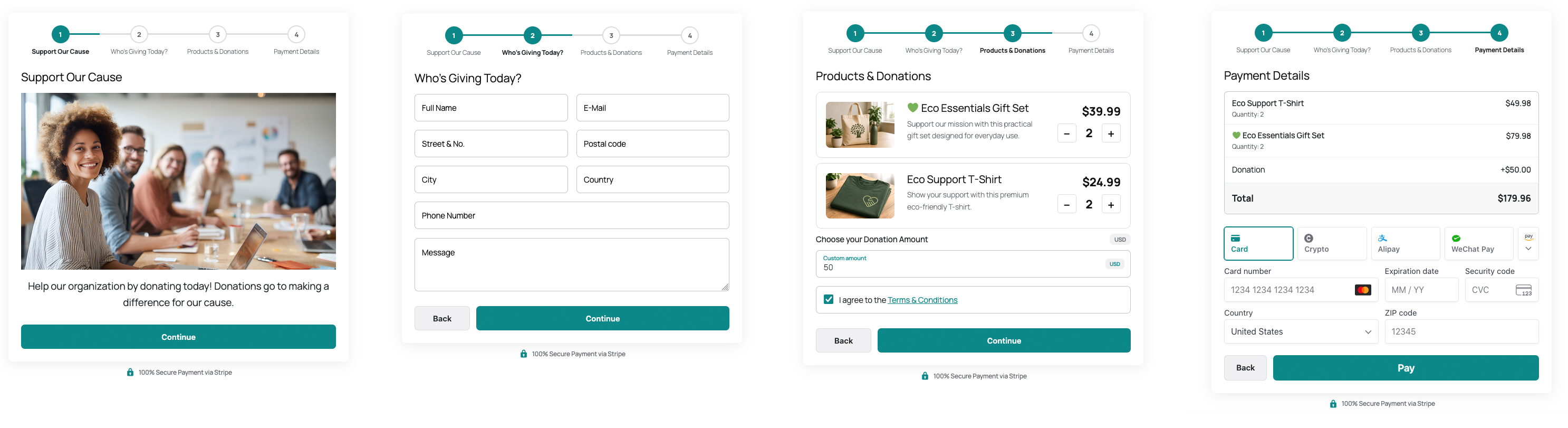
Multi-Step Checkout created with the Easy Stripe Payments & Donations Checkout Builder. Click the image to view the full-size version.
Sell Physical and Digital Products
The Checkout Builder can be used for many different types of products and services.
You might use it to sell:
- Merchandise and supporter products
- Digital downloads or resources
- Coaching packages
- Workshops or services
- Event-related products
- Small collections of physical products
For businesses and organizations that only need a focused selection of products, this can effectively become a mini online shop powered by Stripe.
You can get started quickly without first configuring a complete e-commerce platform.
Combine Products and Donations in One Checkout
One of the most interesting possibilities of the Checkout Builder is the ability to combine product sales and donations within the same checkout flow.
This is particularly useful for nonprofits, charities, associations, and other mission-driven organizations.
For example, a supporter could purchase a T-shirt or reusable water bottle and also add an optional donation before completing the payment.
Instead of separating your online shop and donation form into different systems, both can become part of a single checkout experience.
This also opens up interesting possibilities beyond nonprofits. Businesses, creators, community projects, and other organizations can combine purchases with optional contributions or support.
Build the Checkout Around Your Needs
Every checkout does not need to look or behave the same.
With the Checkout Builder, you can structure your checkout using different components and arrange them across multiple steps.
Depending on your use case, your checkout can include products, donation options, customer information, custom input fields, text and HTML content, images, discounts, fees, taxes, and payment-related elements.
This makes it possible to create anything from a very simple product checkout to a more detailed multi-step payment experience.
You decide what information customers see and when they see it.
Collect Additional Information with Stripe Metadata
A checkout is often about more than collecting a payment.
You may also need additional information from your customers, donors, or clients.
Custom information entered during the multi-step checkout can be stored together with the successful payment as Stripe metadata.
For example, you could collect information related to an order, event registration, coaching request, donation, or another custom workflow.
This helps keep important checkout information connected to the corresponding Stripe payment.
Why Use a Mini Shop Instead of a Full E-Commerce Platform?
WooCommerce and other full e-commerce platforms are excellent solutions when you need advanced shop functionality.
But there are also many situations where a simpler solution makes more sense.
If you only want to sell a handful of products or services, a lightweight Stripe checkout can help reduce setup time and keep your WordPress installation focused.
You don’t necessarily need to configure a complete store infrastructure just to accept payments online.
With Easy Stripe Payments & Donations, you can focus on the essential workflow:
Create your checkout → add your products → connect Stripe → start accepting payments.
For smaller shops, nonprofits, coaches, freelancers, creators, and organizations, this can be a much faster way to launch.
A Checkout That Can Grow with Your Use Case
You might start with a simple payment form and later decide that you want to collect additional customer information, introduce multiple products, add donation options, or organize everything into several checkout steps.
The Checkout Builder gives you the flexibility to adapt the checkout as your requirements evolve.
You don’t have to start by building a large online store.
Start with the checkout you need today and expand it when necessary.
Start Building Your Stripe Checkout in WordPress
The Easy Stripe Payments & Donations plugin is designed to make accepting Stripe payments in WordPress straightforward while still giving you the flexibility to create more advanced payment experiences when you need them.
With the Checkout Builder and multi-step checkout functionality, you can create a lightweight mini shop, sell products and services, collect donations, or even combine products and donations in a single checkout.
And you can do it without setting up a complete WooCommerce store.
If you’re looking for a simple way to sell products with Stripe in WordPress, the Checkout Builder gives you a fast and flexible place to start.
Build your checkout. Add your products. Connect Stripe. Start selling.